Phishing email example · Tactic: Authority
GoDaddy phishing email example: fake domain verification notice
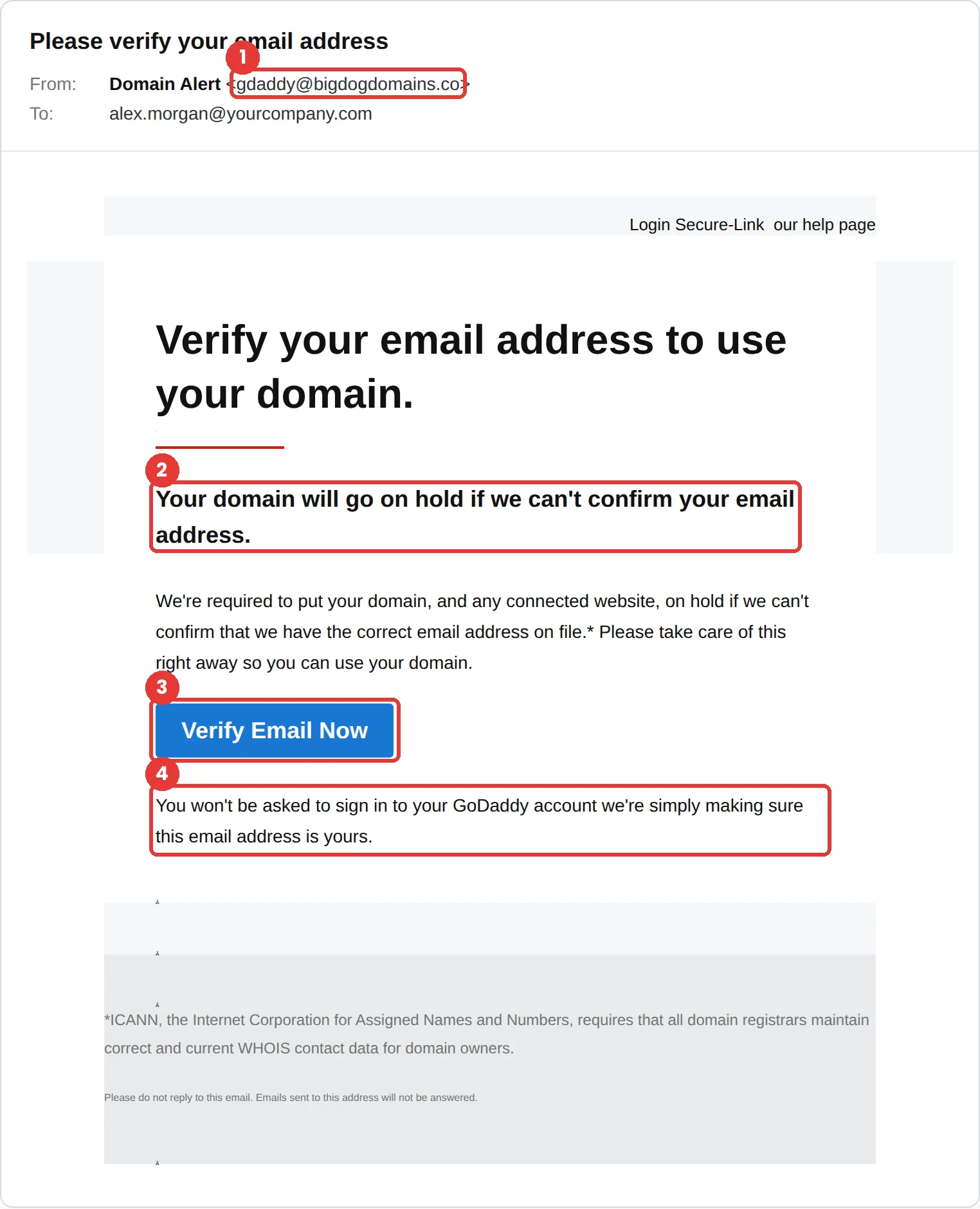
This GoDaddy phishing email says your domain will go on hold unless you verify your email address, and cites an ICANN rule to sound official. The fastest tell is the sender: gdaddy@bigdogdomains.co is a misspelled name on an unrelated domain, not GoDaddy.
The red flags
- Subject
- Please verify your email address
- From
- gdaddy@bigdogdomains.co
- 1
A misspelled sender on an unrelated domain
“gdaddy” at bigdogdomains.co is not GoDaddy. The display name, “Domain Alert,” doesn’t even use the brand.
- 2
An outage threat
“Your domain will go on hold” is written to make a website owner act before checking.
- 3
One button does everything
The only path offered is Verify Email Now. A real notice can always be checked by signing in to your GoDaddy account yourself.
- 4
A promise meant to disarm you
Saying you won’t be asked to sign in is a common trick. The page behind the button often asks for exactly that.
Why this GoDaddy scam works
For a small business, a domain on hold means the website and email stop working. That is a real, expensive outage, and the email puts it front and centre in bold.
It borrows real authority. Registrars do have to keep domain contact details accurate, and genuine verification emails exist, so the ICANN footnote makes the request feel routine. The line “You won’t be asked to sign in” is there to lower your guard right before you click.
The tactic: Authority. It appears to come from someone senior, and questioning them feels costly. See all six tactics.
Who gets this email
Anyone who owns a domain: small business owners, freelancers, IT staff and the MSPs who manage domains for clients. People who look after several domains are used to getting notices like this, so one more rarely stands out.
Other versions of this scam
- A “domain expiring” or renewal-failed notice with a payment link.
- A fake DNS or SSL certificate warning asking you to sign in and “fix” a setting.
- A domain transfer or ownership-change alert that says you must act to stop it.
Check it in 30 seconds
- Read the sender address, not the display name.
- Sign in to your registrar yourself, from a bookmark, and look for the same notice.
- Check whether the email names your domain. This one doesn’t.
- Be wary of any message that promises you won’t need to sign in.
What happens if someone clicks
The Verify Email Now button in an email like this usually leads to a copy of a registrar sign-in page. A stolen domain account is powerful: the attacker can point your website and email somewhere else, catch password-reset emails for your other services, or transfer the domain away. For a business, that can take email and the website down at the same time.
How to report a GoDaddy phishing email
- At work, use your email’s Report Phishing button, or forward the message to your IT or security team, before anything else. They can pull the same email from everyone else’s inbox.
- GoDaddy asks for phishing that impersonates it to be reported to its security team through its abuse reporting system. Its phishing form also takes the fake site the email links to. GoDaddy: reporting abuse
- Forward the email to the Anti-Phishing Working Group at reportphishing@apwg.org. APWG reporting
- If you lost money or shared personal details, report it to the FTC. ReportFraud.ftc.gov
Already clicked? Close the page, change the password for any account you entered, sign out of active sessions, and report it anyway. Speed matters far more than blame.
Questions about GoDaddy phishing emails
Registrars are required to keep domain contact details accurate, so real verification emails do exist. That is exactly why this template works. Check by signing in to your GoDaddy account directly, never through the email’s button.
At work, report it to your IT or security team first. GoDaddy asks for phishing that impersonates it to be reported through its abuse reporting system, and you can also forward the email to the APWG at reportphishing@apwg.org.
Change the password on the real site straight away, turn on two-step verification, and check your domains, DNS records and contact details for changes you didn’t make.
It is a phishing simulation template from Hook Security’s library, modelled on real attacks. Links and tracking have been removed from the screenshot.
Give your team a safe first encounter with emails like this.
Hook sends realistic simulations built from real attacks, then a short training moment right after any click. It runs on Autopilot.