Phishing email example · Tactic: Social Proof
monday.com phishing email example: fake board invitation
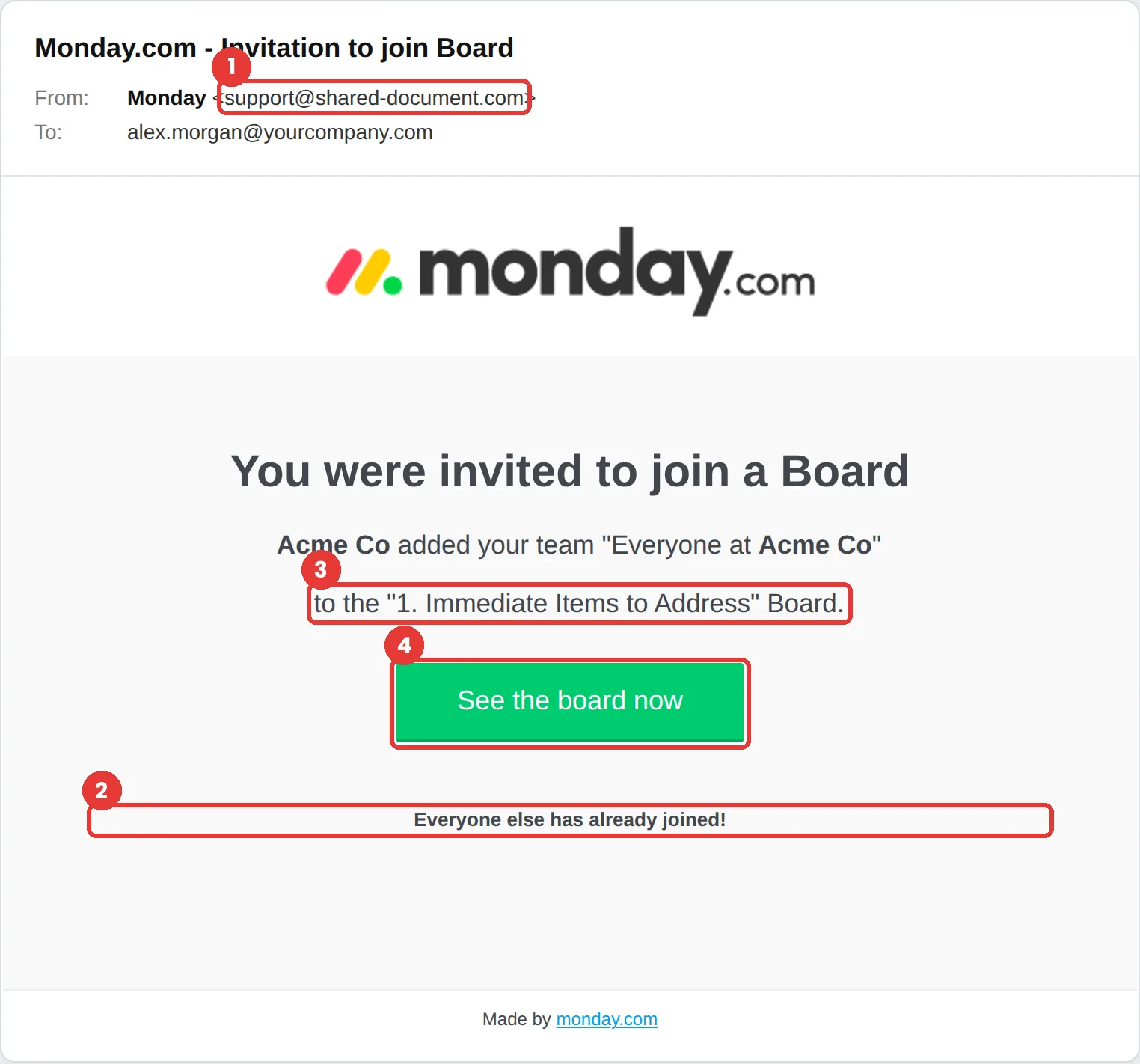
This monday.com phishing email says your whole team was added to a board called “1. Immediate Items to Address” and that everyone else has already joined. The tell is the sender, support@shared-document.com. monday.com says its notification emails come from notifications@monday.com.
The red flags
- Subject
- Monday.com - Invitation to join Board
- From
- support@shared-document.com
- 1
The wrong sender
monday.com notifications come from notifications@monday.com. shared-document.com is unrelated.
- 2
“Everyone else has already joined”
Pressure built on what others supposedly did. Real invites rarely tell you who has already accepted.
- 3
A vague, urgent board name
“Immediate Items to Address” is designed to make you curious and a little worried.
- 4
A sign-in after the click
If “See the board now” leads to a password page instead of your existing account, close it.
Why this monday.com scam works
“Everyone else has already joined!” is social proof: if your colleagues are already in, joining feels safe and even overdue. The board name adds a quiet sense of urgency.
Project-management invites are a normal part of work, and the email uses monday.com’s real logo and clean layout. It asks for one click, which is the whole point.
The tactic: Social Proof. Others have supposedly already acted, so complying feels normal rather than risky. See all six tactics.
Who gets this email
Teams that already use project-management tools, where board invites arrive constantly. Attackers put a company’s own name in the email, as this template does, so it reads like an internal request.
Other versions of this scam
- A “you were mentioned in an update” notification with a link to reply.
- A shared-form or file invite that asks you to sign in to view it.
- A fake billing or seat-limit warning aimed at workspace admins.
Check it in 30 seconds
- Compare the sender with notifications@monday.com.
- Look for the same invite inside monday.com, not in the email.
- Ignore “everyone else already joined” pressure; it proves nothing.
- Ask the colleague who supposedly added you.
What real monday.com email looks like
- monday.com’s support article says notification emails are sent from notifications@monday.com, and suggests adding it to your contacts. Source: monday.com support
What happens if someone clicks
Clicking See the board now in an email like this usually leads to a fake sign-in page for the tool itself or for Microsoft or Google single sign-on. A captured work login gives the attacker your projects, files and conversations, and a trusted internal account to send more invites from.
How to report a monday.com phishing email
- At work, use your email’s Report Phishing button, or forward the message to your IT or security team, before anything else. They can pull the same email from everyone else’s inbox.
- monday.com does not publish a phishing-report address for customers. Its security contact covers vulnerabilities, not spoofed email, so use the general channels below.
- Forward the email to the Anti-Phishing Working Group at reportphishing@apwg.org. APWG reporting
- If you lost money or shared personal details, report it to the FTC. ReportFraud.ftc.gov
Already clicked? Close the page, change the password for any account you entered, sign out of active sessions, and report it anyway. Speed matters far more than blame.
Questions about monday.com phishing emails
Easily. Company names, logos and even team names are public or easy to guess, so a phishing email that mentions your organization is not a sign that it is genuine.
monday.com’s support documentation says notifications come from notifications@monday.com. Invites from other domains should be checked inside your monday.com account first.
It is a social-proof tactic. Telling you that others have acted makes clicking feel normal and safe, which lowers the chance you stop to check the sender.
It is a phishing simulation template from Hook Security’s library, modelled on real attacks. Links and tracking have been removed from the screenshot.
Give your team a safe first encounter with emails like this.
Hook sends realistic simulations built from real attacks, then a short training moment right after any click. It runs on Autopilot.